
3 weeks, 20 training rounds, $600:
a local computer use agent that asks first
I trained a small Jev-style decision model to drive my Mac
gxcsoccer·October 4, 2026·8 min read
The day after TypeSafe launched Jev, its decision model, I started a new repo to find out one thing: can a model small enough to fit on a Mac make Jev-style decisions, one step at a time, and actually drive my computer?
Three weeks in, counting the vision model I’d started a few days earlier, that’s about twenty training rounds and roughly $600. The answer so far is partly. And there’s one thing it does better than most agents I’ve tried. When it isn’t sure, it stops and asks.
Here’s the demo task. Find Lisa Wong’s order in a text file and add it to a spreadsheet. There are two Lisa Wong orders in the file. Most agents pick one, write it, and report success. DeskMind stopped and asked which one I meant.
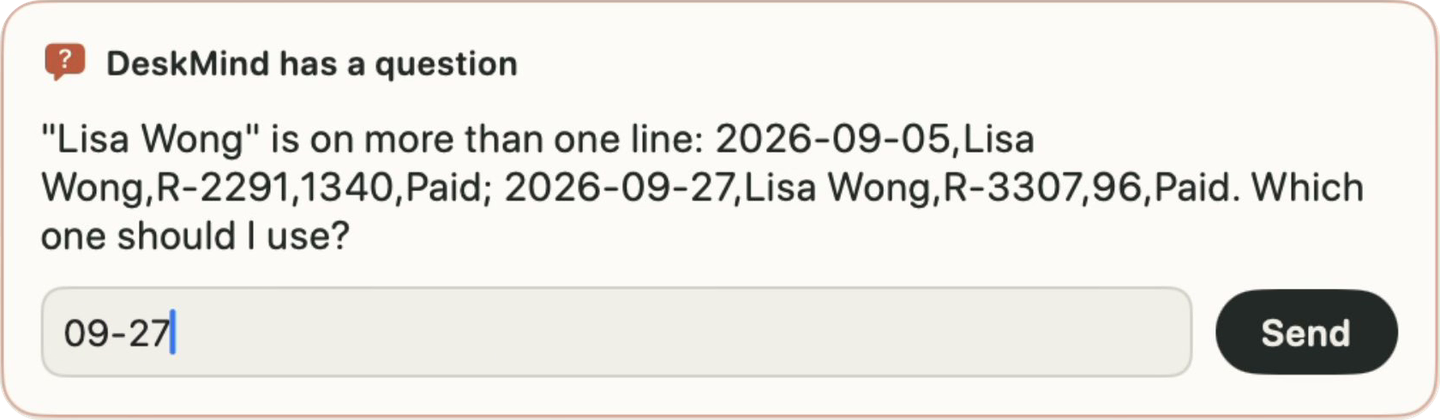
DeskMind is an open-source computer use agent for the Mac, and every decision is made by a model running on the laptop itself.
Demo (56 s) · Mac app · GitHub
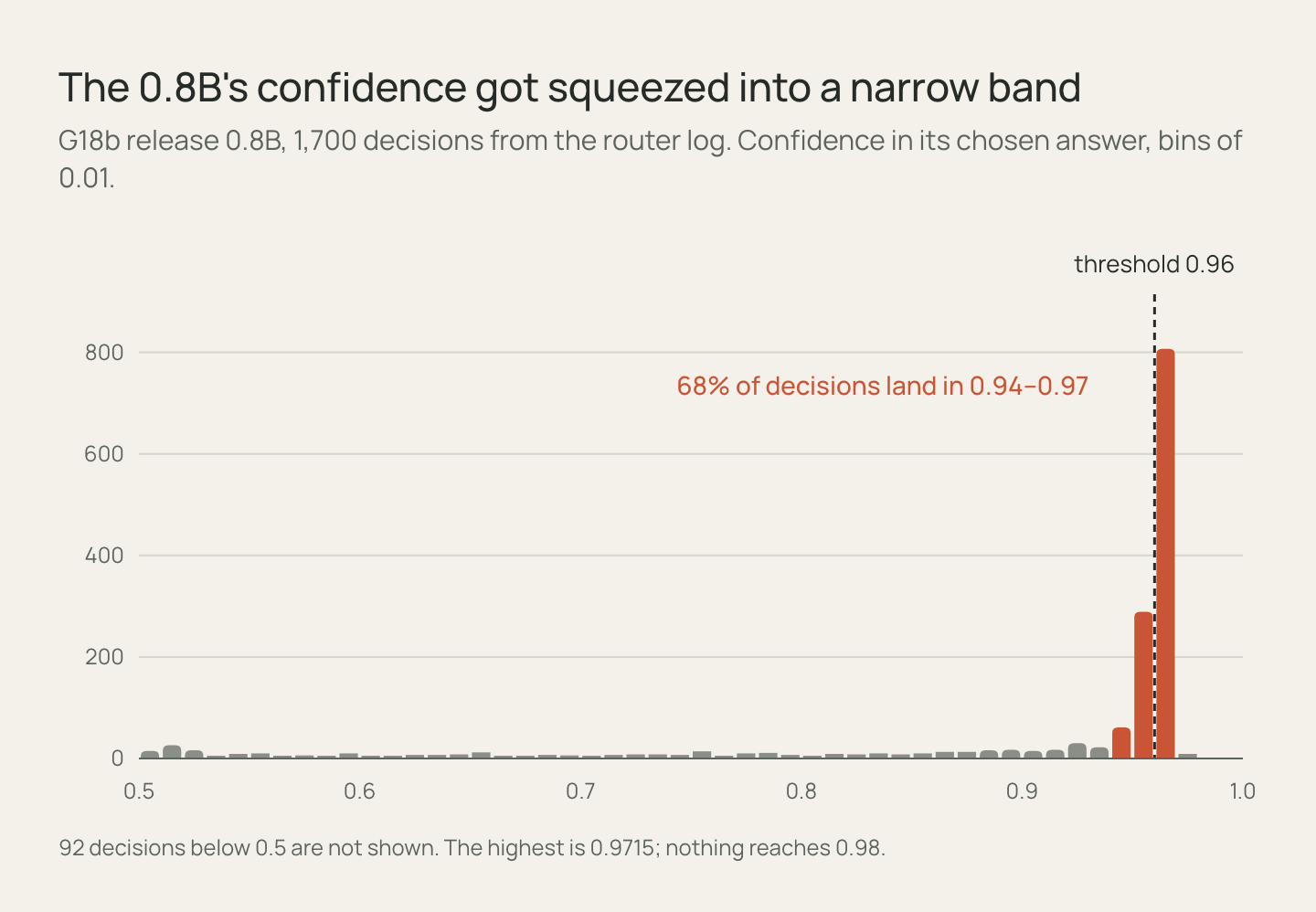
This post is how I built it and where it went wrong. If you build agents, three things might be worth your time. An agent only learns to ask if the harness gives it an “ask” option. “Done” has to be checked, not believed. And smoothing my labels to 0.95 squeezed the 0.8B’s confidence right up against the routing threshold, which is why 70% of steps go to the slow model.
Why I wanted it local
I use computer use agents a lot these days. The more I used them, the more three things bothered me.
My screen goes to someone else’s server at every step. Mail, files, whatever happens to be open.
It’s expensive. A task is dozens of steps, and each one re-sends the screen and the history. That’s a lot of tokens to click a button.
It’s slow. The best models are busy, every step is a round trip, and a one-minute task turns into five.
So I wanted to know how far a small local model could get if the code around it, the harness, was built for it. Not everything, probably. But if it handled most steps and passed the hard ones to something bigger, I’d get privacy, no per-step bill and speed from the same design.
Eyes first, then a brain
I started with seeing, because plenty of apps have no accessibility tree and you have to find the button in pixels. That became Eyes, a 4B grounding model. It was also my first time post-training anything. I did SFT and then RL, and the platform followed the money. Tinker was the easiest and the most expensive. Aliyun PAI was cheaper. In the end I just rented GPUs by the hour, which was the best deal.
Then Jev came out and decision models were suddenly everywhere. The idea clicked for me immediately. Don’t ask a chat model to write out its next action. Ask it a multiple-choice question and read a probability for every option. It’s fast, there’s nothing to parse, and a low probability shows you when it’s hesitating.
The catch was that it’s a cloud API, and I didn’t want a cloud dependency in the middle of a local agent. So I tried to train my own. That’s Brain: Qwen3.5 0.8B and 4B with LoRA, running as 8-bit MLX on Apple Silicon, speaking the same /v1/systemone format.
Around them there’s Hands (the macOS harness), a Mac app that packages everything, and Bench, the real-desktop tasks I measure it on. All five are open source.
The part I didn’t expect
I’ve built agents before, and it was always the same job. You write a harness around a model you can’t change. When the model is wrong in some consistent way, you tweak the prompt and add retries.
Owning both sides is different. You can train the model for exactly what the harness asks, and make the harness cover for what the model is bad at.
Take the Lisa Wong case. The harness notices that two rows match and adds “ask the user” to the options. The model is trained to pick it in that situation. Neither half could do that alone.
Or finishing early, which is how most agents fail. The model says “done”, and the harness checks the actual file before believing it. The model is also trained on near-identical pairs, like saved vs. unsaved or the last line missing, so it rarely says “done” too early in the first place.
Or the time it kept playing the studio version of a song when I’d asked for the live one. I trained it on matched pairs where the screen was the same and only the “(Live)” detail differed. Fixed in one round.
That loop, where the model shapes the harness and the harness shapes the model, ended up being what I care about most in this project.
How a step gets decided
Each step becomes a few typed questions: which operation, which element, which value. Brain reads the logits of the option letters in a single prefill and returns a probability for each option. It never writes free text.
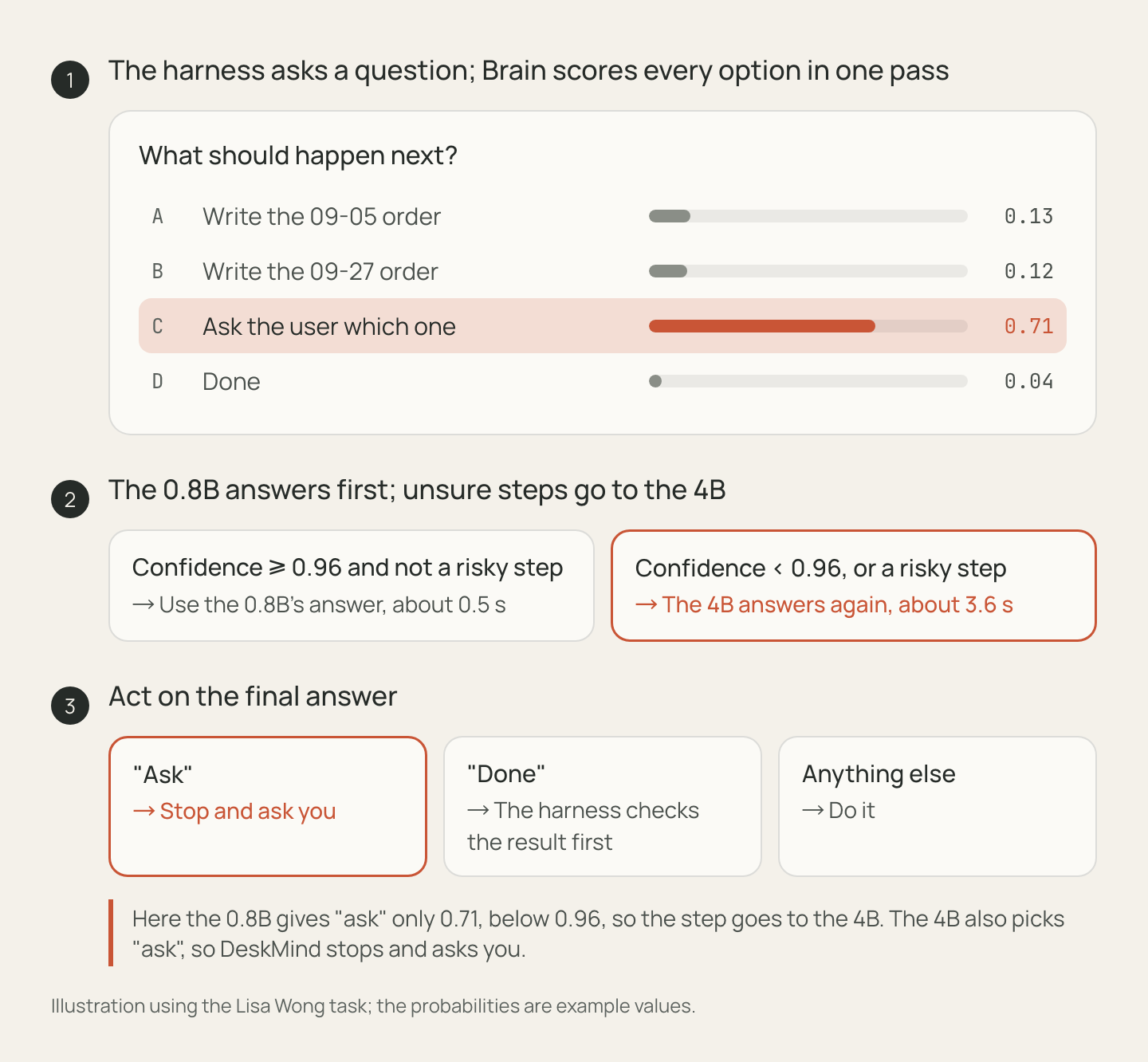
The probabilities decide what happens next. The 0.8B answers first, and if it’s below 0.96, or the step is risky, the 4B answers again. When two options are both plausible, the harness adds “ask” to the list, and if that’s the final answer, it stops and asks you. If the final answer is “done”, it only counts after the harness checks the final state.
It has limits. Multiple choice gets rid of format errors, not judgement errors. If the right option isn’t in the list, the model will still pick something.
Did it work?
Partly.
Privacy: yes. Decisions run on your Mac, and the model servers only listen on localhost. The app goes online once, to download the models.
Cost: per step, it’s zero. The bill moved to training instead, about $600 over three weeks for GPUs, training APIs and labels.
Speed: not yet. When the 0.8B is confident, a decision takes about 0.5 s. But in this release about 70% of steps go up to the 4B at about 3.6 s each, so the median is 2.85 s and the slowest 5% take almost 10 s. That one’s on me, and I explain why below.
Hybrid: halfway. The 0.8B → 4B router is the local half. An optional cloud tier for the hardest steps is designed but not in the app yet.
The numbers, with their caveats:
| Result | Scope | |
|---|---|---|
| Real desktop (bench v25) | 39/39 correct results, 0 false “done” | 13 tasks I wrote × 3 runs, one M4 Pro, through the app; per-task results |
| ScreenSpot-Pro (Eyes) | 50.9% as the app runs it; 67.7% on a GPU at full resolution | Mostly resolution: on the same 300 items, 2 MP scores 49.3% and 4 MP 59.0% |
| JevBench v1.4.2, public set | 0.835 (193/231), 4B | Submission; sealed run pending |
39/39 sounds better than it is. It’s 13 tasks I wrote, on one machine. In all 3 runs of one task (G04) the model got the file right but never said “done” and used up its 20 steps, which still counts as a pass because the grader checks the result. The bench and every per-task result are public, so please run it yourself. It still struggles with tables longer than about four rows and with forms filled from a photographed receipt.
What twenty training rounds taught me
Evaluation is the hard part. Almost every round fixed the last bug and quietly learned a new shortcut. One round fixed an ordering bug and then said “done” on the wrong order. The next fixed that and overwrote a header. Holdout sets cut from the same data have the same shortcuts, so they never caught it. What worked was a gate that replays every failure I’ve ever collected against the previous release before anything touches the real desktop.
The shape of a prompt can leak the label. My “done” examples had fewer questions than the others, so the model learned that a short prompt means done.
A fixed soft label flattens confidence. I trained the 0.8B on labels smoothed to 0.95. Its confidence collapsed into a 0.94–0.97 band, so the router couldn’t tell easy steps from hard ones. That’s the 70% escalation rate above. Next round it learns from the 4B’s predicted probabilities instead.
Asking has to be trained, and defended. One round never learned to ask and confidently wrote the wrong row. A later one lost some of it until I re-tuned the threshold. It’s now its own check in the gate.
Thanks, Claude Code
Three weeks, five repos, a Mac app, a benchmark and about twenty training rounds. I couldn’t have finished that without Claude Code. I had several sessions running in parallel, one on the models and training and one on the harness, the app and the evals. They coordinated through issues in a private repo, wrote most of the code, ran the training and the desktop tests, and caught a lot of my mistakes. My job was deciding what to build, what to measure, and when something was good enough to ship. Whoever wrote the code, every release still has to pass the real-desktop gate.
Try it
The Mac app needs macOS 15+, Apple Silicon and about 7 GB of free memory while it runs. Download the DMG. The first run pulls about 5.3 GB of models, from Hugging Face, or ModelScope if that’s faster for you. ⌘. stops a run, and touching the mouse pauses it.
Or use Brain in your own agent:
git clone https://github.com/deskmind-ai/brain && cd brainuv sync --extra mlxuv run hf download deskmind/brain-0.8b --revision g18b-q8 --local-dir models/brain-0.8buv run hf download deskmind/brain-4b --revision g18b-q8 --local-dir models/brain-4buv run deskmind-brain-serve --predictor mlx:models/brain-0.8b --escalate-to mlx:models/brain-4b --two-stage --port 8796curl -s localhost:8796/v1/systemone -H 'Content-Type: application/json' -d @examples/request.jsonThere’s a 30-line client in the docs.
Next up: a faster 0.8B, more apps, and a cloud tier for the steps a local model shouldn’t decide. If you’ve ever built an agent around a model you couldn’t touch, I’d love to hear whether owning both sides would change how you work. The easiest way to help: give it an ambiguous task and see whether it asks or guesses. If it guesses wrong, post the example in this issue. For ideas and questions, there’s Discussions.